QSTools UTM Builder: How to Create Campaign URLs and Measure Traffic Sources
When you work with SEO, SEM, email marketing, or social media, one of the most important questions is also one of the hardest to answer:
Where do the visits to my website actually come from?
Knowing that a campaign generated traffic is helpful. Knowing exactly which platform, campaign, ad, newsletter, or variant brought those visits is far more valuable.
That is where UTM parameters come into play.
UTMs allow you to add tracking parameters to a URL so that analytics tools can identify the source of a visit and associate it with a specific campaign. Google Analytics, for example, uses these parameters to attribute traffic across different sources, mediums, and campaigns.
The problem is that creating these URLs manually can be tedious and prone to errors, especially when managing multiple campaigns and variations.
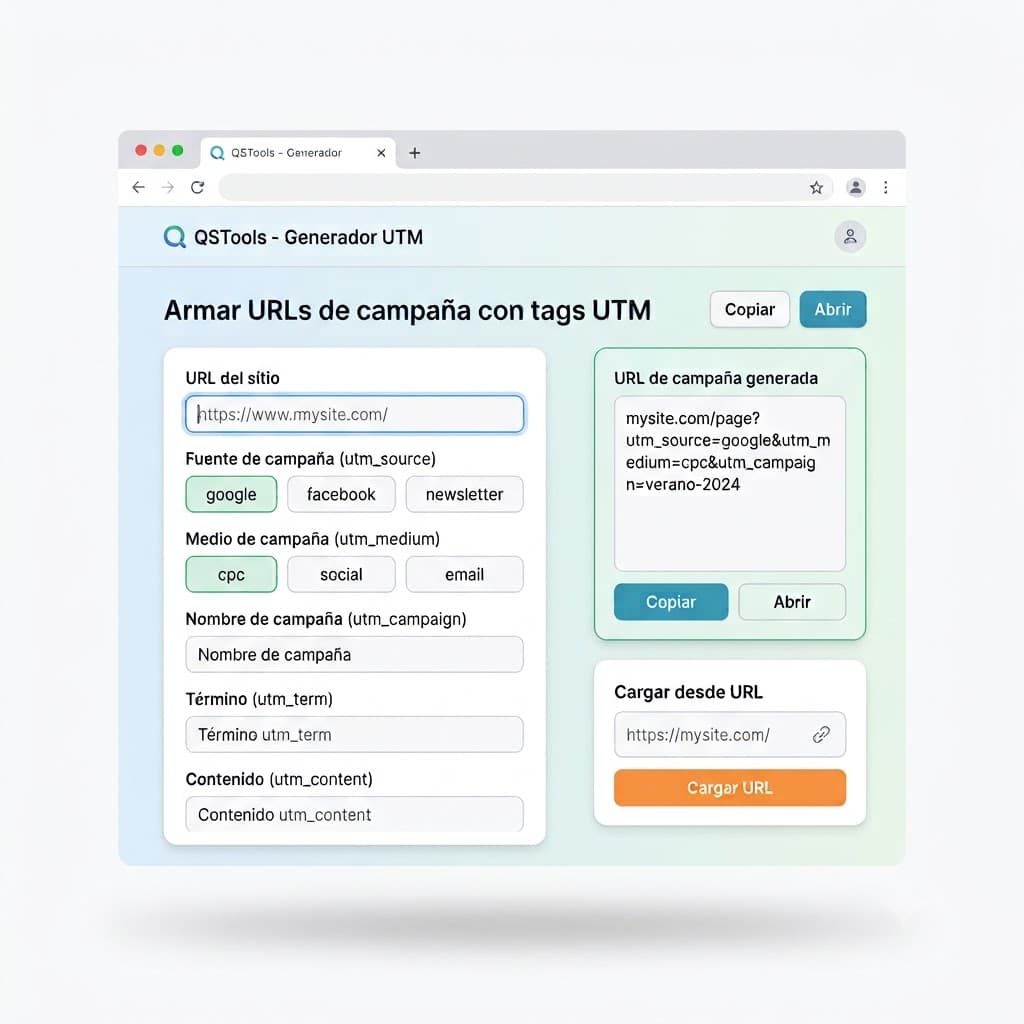
To simplify this process, QSTools UTM Builder was created—a developer tool designed to generate tagged URLs directly inside your browser.
In this article, we will explore what UTMs are, what they are used for, how to use the tool, what to do with the generated URLs, and what sets QSTools apart from other available generators.
What is a URL with UTM Parameters?
A URL with UTM parameters is simply a web address tagged with query parameters that identify the origin of the traffic.
For example, a standard URL might look like:
https://www.example.com/serviceWhile a tagged URL would look like this:
https://www.example.com/service?utm_source=linkedin&utm_medium=social&utm_campaign=launchThe destination page remains identical.
The parameters do not change the page's content. Instead, they attach metadata explaining how the user got there.
When someone clicks that link, your analytics platform reads those values to classify the visit.
In Google Analytics, for example, utm_source, utm_medium, and utm_campaign help identify the source, medium, and campaign associated with the visit.
What are UTMs Used For?
Imagine you post the exact same link in five different places:
- ◆A Google Ads campaign.
- ◆A LinkedIn post.
- ◆An email newsletter.
- ◆A Reddit post.
- ◆A banner on an external website.
If all of them use the exact same plain URL, it becomes nearly impossible to determine which action generated which visit.
With UTMs, we can distinguish every single origin.
For example:
utm_source=google
utm_medium=cpc
utm_campaign=seo-services
or:
utm_source=linkedin
utm_medium=social
utm_campaign=seo-services
This allows your analytics platform to separate both traffic streams.
You move from a generic question:
"How much traffic did my campaign generate?"
To much more actionable insights:
"Which channel drove the highest volume of visits?"
"Which specific campaign brought the most conversions?"
"Which ad variation had the best performance?"
This level of granular data is fundamental for making data-driven marketing decisions.
The Five UTM Parameters You Can Use
QSTools supports the five standard UTM parameters:
- ◆
utm_source - ◆
utm_medium - ◆
utm_campaign - ◆
utm_term - ◆
utm_content
The first three are the primary parameters used to identify source, medium, and campaign.
The remaining two are optional and particularly helpful for paid campaigns and A/B testing experiments.
1. UTM Source: Where is the traffic coming from?
utm_source identifies the referring entity or platform.
Examples:
google
linkedin
facebook
reddit
newsletter
bing
devto
For instance:
utm_source=linkedinindicates the traffic originates from LinkedIn.
The most critical recommendation is maintaining a consistent naming convention. linkedin and LinkedIn can be treated as separate values in reports because UTM parameters are case-sensitive.
2. UTM Medium: What type of channel is it?
utm_medium describes the marketing medium used to acquire the traffic.
Common values include:
cpc
email
social
referral
organic
affiliate
For example:
utm_medium=cpcidentifies traffic associated with a cost-per-click advertising campaign.
While:
utm_medium=emailrepresents traffic from email marketing.
Google recommends using consistent values across all campaigns to avoid fragmenting analytics data.
3. UTM Campaign: Which campaign does it belong to?
utm_campaign identifies the specific marketing initiative or promotion.
Examples:
utm_campaign=product-launchor:
utm_campaign=winter-promoThis parameter allows you to group different sources and mediums under a single overarching initiative.
google / cpc / winter-promo
linkedin / social / winter-promo
newsletter / email / winter-promo
All belong to the same campaign but come from different channels.
4. UTM Term: Which keyword triggered the visit?
utm_term is designed primarily to track paid search keywords or targeting terms.
Example:
utm_term=technical-seoIt is especially useful when differentiating keywords within a paid campaign.
However, it is optional—for many organic and social campaigns, source, medium, and campaign are sufficient.
5. UTM Content: Which content variation won the click?
utm_content differentiates variations of an ad, link, or call to action pointing to the same URL.
For example:
utm_content=image-aand:
utm_content=video-bYou can use it to compare:
- ◆Ads & creatives
- ◆Images vs. videos
- ◆CTAs & button text
- ◆Newsletter link placement
- ◆A/B test variations
Google recommends using this parameter to distinguish creatives or links within the same campaign.
How Does QSTools UTM Builder Work?
The tool is designed to streamline the entire process.
Instead of manually constructing URLs and worrying about syntax, you simply fill in the relevant fields.
Starting from a target URL, you can enter or select:
Target URL
The page you want users to land on.
https://www.mysite.com/servicesSource
Where the traffic originates.
linkedinMedium
The marketing channel type.
socialCampaign Name
The name of the initiative.
services-2026And optionally:
Term
Keyword associated with paid search.
Content
Specific ad creative or link placement.
Once entered, QSTools automatically constructs and formats the final URL.
A Practical Example
Suppose you have an SEO services page:
https://www.mysite.com/seoYou want to promote it on LinkedIn as part of a campaign named seo-services.
You configure:
Source
linkedinMedium
socialCampaign
seo-servicesQSTools generates a URL like:
https://www.mysite.com/seo?utm_source=linkedin&utm_medium=social&utm_campaign=seo-servicesThis is the tagged link you place in your LinkedIn post.
What Do You Do With the Generated URL?
This is a crucial point: the generated URL is not meant to be saved just for reference.
It is the link you must actually insert wherever you want to track user clicks.
For example:
Google Ads
Use it as your final destination URL when custom tracking template parameters are required.
Email Marketing
Attach it behind your CTA buttons:
Explore Our Services
The user sees clean button text, but clicking navigates through the tagged URL.
Social Networks
Use it in posts, profile bio links, ad campaigns, or stories.
Banners
When advertising on external blogs or partner sites, tagged URLs classify that traffic as referral or paid banners according to your taxonomy.
Newsletters
Use different utm_content values to determine which link placement inside the email drove the most clicks.
No Special Server Configuration Required
A major advantage of UTM parameters is that you do not need to create separate landing pages for each campaign.
If your page is:
https://www.mysite.com/contactYou can use:
https://www.mysite.com/contact?utm_source=linkedin&utm_medium=social&utm_campaign=servicesThe destination page remains /contact.
The parameters travel with the URL for your web analytics tool to interpret.
When a user visits, your analytics script logs the parameters and classifies traffic acquisition accordingly.
Where Do You View the Data Afterwards?
It depends on your analytics platform.
UTMs are a universal web standard supported by virtually all analytics platforms.
QSTools works seamlessly with:
- ◆Google Analytics 4
- ◆Umami
- ◆Plausible
- ◆Cloudflare Analytics
- ◆Any platform supporting standard query strings
In Google Analytics 4, for instance, you can analyze Source, Medium, and Campaign dimensions under Acquisition reports to evaluate campaign performance alongside event conversions.
An Important Distinction: Tracking Traffic vs. Tracking Conversions
Adding UTMs does not automatically calculate revenue or lead submission by itself.
UTMs answer:
"Where did this user come from?"
To answer:
"What did they do after landing?"
You need goal events and conversion tracking set up in your analytics suite.
For example:
LinkedIn
↓
Landing page
↓
Form submission
↓
Lead
The UTM identifies the acquisition channel.
Your analytics event configuration records the conversion.
Combining both reveals actionable outcomes:
LinkedIn drove 350 visits and 12 lead conversions.
What Makes QSTools Different?
Many UTM builders exist, including Google's official Campaign URL Builder.
So why use QSTools?
The difference lies in how it solves the problem.
A Simple, Focused Tool
QSTools strips away unnecessary clutter for users who simply want to generate a tagged link fast.
The flow is direct:
URL → Parameters → Final Tagged Link
No account required.
No Google Analytics property configuration needed.
No dashboard logins.
Generate your link and keep moving.
The Technical Advantage: Client-Side Processing
One of the key technical features of QSTools is that URL generation occurs entirely in your browser.
This is known as client-side processing.
In simple terms:
The data you type never leaves your browser to be processed on a remote server.
The web application executes locally inside your browser tab.
Benefits include:
Enhanced Privacy
Internal campaign names, product names, or draft URL structures are not sent to third-party backends.
Zero Infrastructure Delays
Instant calculation without network latency.
Offline & Lightweight
Deterministic client-side calculation requires no server payload.
The tool does not need to store or monitor your campaigns to fulfill its purpose.
Your URLs Never Leave the Page
QSTools explicitly guarantees that your generated URLs are neither saved nor uploaded anywhere.
You open the tool, input your values, copy the output URL, and continue your workflow.
Edit Existing Tagged URLs
Another convenient feature is the ability to load an existing tagged URL.
Paste a URL like:
https://www.mysite.com/?utm_source=linkedin&utm_medium=social&utm_campaign=launchand QSTools automatically parses the parameters into editable fields.
QSTools vs. Manual UTM Construction
While you can write query parameters by hand:
https://www.mysite.com/?utm_source=linkedin&utm_medium=social&utm_campaign=launchdoing so manually across dozens of links leads to typos and fragmented reports (linkedin vs. LinkedIn, cpc vs. CPC).
A generator eliminates syntax errors and enforces standard conventions.
QSTools vs. Google Campaign URL Builder
| Feature | QSTools | Google Campaign URL Builder |
|---|---|---|
| Standard UTM parameters | ✅ | ✅ |
| Destination URL | ✅ | ✅ |
| Source / Medium / Campaign | ✅ | ✅ |
| Term / Content | ✅ | ✅ |
| Simple UI | ✅ | ✅ |
| Dedicated UTM focus | ✅ | ✅ |
| 100% Client-side processing | ✅ | — |
| No Google ecosystem lock-in | Yes | Tailored for Google |
| Parse & edit existing URLs | ✅ | Secondary |
UTM Belongs to the Web, Not Just Google Analytics
UTM tags are open web query parameters. They are not proprietary to Google.
Whether you use Umami, Plausible, Cloudflare Analytics, or GA4, QSTools provides an open, privacy-first generator for any analytics stack.
Best Practices for UTM Naming Conventions
- ◆Use lowercase strictly:
linkedin,google,facebook. - ◆Standardize mediums:
cpc,social,email,referral. - ◆Descriptive campaigns:
product-launch-2026,summer-sale. - ◆Specific content tags:
header-cta,footer-banner,variant-b.
Summary
UTMs remain a vital building block for digital marketing and analytics attribution.
QSTools UTM Builder makes creating and editing UTM links fast, effortless, and private with 100% client-side execution directly in your browser.
Related Articles
Explore more curated content on SEO, Artificial Intelligence, and Web Development.

GEO: The Evolution of SEO for AI
Discover what GEO (Generative Engine Optimization) is, how AI search works technically (RAG and Fan-out), and best practices to optimize your website for ChatGPT, Google AI Overviews, Gemini, and Perplexity.

Why a Strong Presence Requires unified strategy
Having a website and social profiles is no longer enough to stand out. Learn why a successful digital presence requires combining UX, web development, technical SEO, and digital ads.
Have a project in mind?
I build modern, fast, and SEO-optimized web solutions. Let's talk!